

Class Registration FAQ
HAVE QUESTIONS ~ WILL ANSWER
Everything you need to sign up, stay enrolled, or change your plans.
We want signing up for a class to feel simple. The same holds true for changing your plans. Find your answers below, or give us a call at (208) 215-4471. We’re happy to help.
Signing up
How do I register for a class?
You can register online or in person at the shop. Each class page with an opening has a Reserve or Book button. If you’d rather sign up in person, stop by or give us a call.
What do I need to register online?
Monthly classes need two things:
An All Things Art account. If you don’t have one yet, you’ll create it as part of the registration process. Once it’s set up, you can log back in anytime to view your upcoming classes, access order receipts, or cancel a class if your plans change.
A PayPal account. Class tuition is billed monthly through PayPal. If you don’t already have one, you’ll be prompted to create one during registration. It’s free and only takes a few minutes. Within PayPal, you can pay by credit card, debit card, or bank account.
Single-session and multi-day classes also need two things:
An All Things Art account. If you don’t have one yet, you’ll create it as part of the registration process. Once it’s set up, you can log back in anytime to view your upcoming classes, access order receipts, or cancel a class if your plans change.
A payment method. You can pay with a credit card (sorry, no American Express), debit card, or PayPal account.
Once you’re all set, registering takes just a few minutes, and your spot in class will be reserved and ready to go.
Where do I find my classes after I register?
Open the Classes menu at the top of our website. You’ll find two pages there:
-
My Recurring Classes for monthly classes
-
My Other Classes for single-session and multi-day classes or workshops
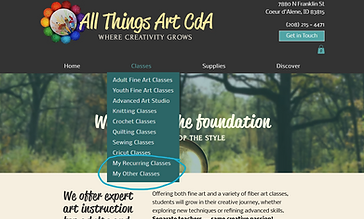
On desktop

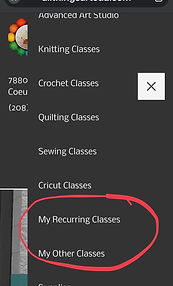
On mobile
You can log in first, too. Look for Log In in the footer at the bottom of any page.

Prefer a direct link?
Monthly classes: allthingsartcda.com/my-classes
Single-session and multi-day classes: allthingsartcda.com/my-other-classes
Monthly classes
How does monthly tuition work?
Monthly tuition covers 4 sessions. It bills automatically on the 28th of each month until you cancel. Your place in class is held for you each week. Some months have a fifth week, which we use to offset days the shop is closed, so your tuition stays the same every month.
When does my class start if I register online?
Online registration begins your class on the 1st of the following month, no matter when in the month you sign up. Your first month of tuition is charged when you register.
Can I start in the middle of a month?
Yes. Please register in person at the shop and we’ll get you started.
How do I cancel a monthly class I registered for online?
You can cancel anytime from your All Things Art account.
1. Log in using the Log In link in the footer at the bottom of any page. (If you skip this step, you can log in at step 3.)
2. Open the Classes menu at the top of our website and choose My Recurring Classes.
3. If you see a Sign Up screen, select the small Log In link next to “Already a member?”

4. Log in the same way you registered: with Google, Facebook, or Email.
5. Find the class you’d like to stop and select the arrow on the right to open it.
6. Select Cancel and confirm.
You’ll receive a confirmation email, and the class will show Canceled with the date. Canceling stops future billing, and you don’t need to cancel anything separately in PayPal.
When should I cancel?
You can cancel anytime. To avoid being billed for the following month, cancel before the 28th. If you cancel mid-month, you keep your place in class through the end of the month you’ve already paid for.
Can I get a refund if I cancel?
Tuition is non-refundable. Canceling stops future charges, and you keep your place through the end of the month you’ve paid for. Missed classes don’t roll over, and full tuition is due each month whether you attend one class or all four.
What happens at the end of the youth fine art term?
Youth fine art classes run September through May. Billing stops automatically at the end of the term, so there’s nothing to cancel. We’ll let you know when re-enrollment opens for the following year.
Can I try a class before I commit?
Drop-ins are welcome in some classes when space allows. Check the class page for the drop-in fee, or call us to ask about availability.
Paying by check or in person
Can I pay in person?
Yes. You can pay by check or card at the shop for any class.
For monthly classes, tuition is due the last class of each month. A $5 late fee is applied after the first of the month. For single-session and multi-day classes, payment is due before class starts.
How do I cancel if I registered or paid in person?
Let your instructor know. For a monthly class, please tell them before the last class of the month, when the next month’s tuition is due, so you aren’t expected to pay for the following month. For a single-session or multi-day class, please tell them before the class starts.
If you can’t reach your instructor, call the shop at (208) 215-4471 and we’ll pass it along. There’s nothing to do online.
Single-session and multi-day classes
These are classes like a one-day workshop offered on several dates, or a multi-day class with a set schedule.
How do I cancel a single-session or multi-day class?
-
Log in using the Log In link in the footer at the bottom of any page. (If you skip this step, you can log in at step 3.)
-
Open the Classes menu at the top of our website and choose My Other Classes.
-
If you see a Sign Up screen, select the small Log In link next to “Already a member?”
-
Log in the same way you registered: with Google, Facebook, or Email.
-
Under the Upcoming tab, find your class and select Cancel.
You can cancel online up until the deadline listed on the class page. After that, please call the shop at (208) 215-4471.
Is payment refundable?
Payment is due when you book and is non-refundable. Each class page lists its cancellation terms.
Account help
I can’t log in, or I don’t see my class. What should I do?
Log in the same way you did when you registered: Google, Facebook, or Email. You can use the Log In link in the footer at the bottom of any page.

If you see “Looks like you don’t have any class registrations yet,” you may be logged in with a different account than the one you registered with.
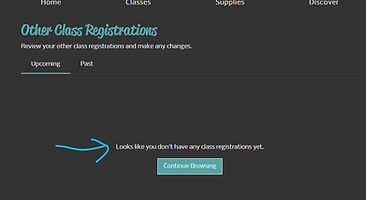
Try logging out and logging back in another way. Please don’t choose Sign Up, since that creates a new account without your classes. You can also use the Forgot password link on the Log In screen. Still stuck? Call us at (208) 215-4471 and we’ll help.